

ViewSystems Machine Designer
The VS OPC-UA Assistant connects modern OPC-UA communication with intelligent data collection, automated analysis, and the targeted use of Artificial Intelligence and Machine Learning. This creates a seamless solution – from the connection to the machine, through the structured recording of process data, to the identification of patterns, causes, and optimization potentials.


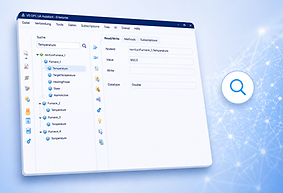
Intelligent Search
Browse the directory for terms. This feature provides you with a significant advantage over other systems. This way, you can find important information much more quickly.
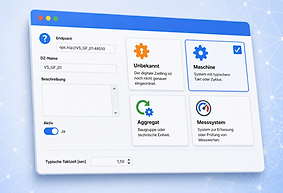

Digital Twin
In addition to the physical plant or system, the assistant creates a digital twin. This enables every user to instantly identify whether it is a machine, a unit, or a measuring system. Furthermore, the assistant provides the appropriate support based on the type of information source.

Dictionary
Many PLC programs are either undocumented or poorly documented. The wizard automatically generates a directory containing all field names used by the controller. This simplifies the search for specific content.
Was möchten Sie mit Ihrer Maschine tun?
Machine Designer begleitet Sie vom ersten Zugriff auf die Maschine bis zur intelligenten Analyse und Automatisierung Ihrer Produktionsprozesse.
Maschine verbinden
Maschine im Produktionsnetzwerk finden und Zugang zu ihren Daten erhalten.
Maschine kennenlernen
Maschinendaten und OPC-UA-Nodes nach bekannten Begriffen suchen und relevante Produktionsinformationen finden.
Produktion beobachten
Entscheidende Maschinenwerte aufzeichnen und Produktionsverläufe nachvollziehen.
Produktion verstehen
Zeiträume vergleichen, Auffälligkeiten untersuchen und Zusammenhänge erkennen.
KI einsetzen
Machine Learning nutzen, um Muster und mögliche Einflussgrößen zu erkennen.
Maschine intelligent machen
Maschinendaten, Produktionswissen und KI zusammenführen und Erkenntnisse live nutzen.
Abläufe automatisieren
Auf Maschinenzustände mit definierten Regeln und Aktionen reagieren.
Anlagenbilder nutzen
Vorhandene Visualisierungen verwenden, um Informationen und Maschinendaten leichter zusammenzuführen.

Record Data
Record the data from your machine or plant control system. The assistant saves the current content when recording begins and any changes that occur thereafter. The software does this automatically for you.

Analyze the causes
Once recorded, data is permanently and readily available to you for understanding the condition of your machines and systems. This enables you to identify correlations and causes of malfunctions, process events, quality deviations, and damage.

AI Analysis
When manual analysis becomes too complex, AI analysis can often provide assistance. AI analysis is based on machine learning and identifies patterns in large volumes of recorded datasets, elucidating the causes of malfunctions or undesirable values.
Database Connection
All connection data and the digital twin are stored in the database. This is already the case with the free version. The "Pro" version additionally stores all recorded data, the dictionary, and AI results in the database, making them available across the company.

Usable Data
After establishing the initial connection to a machine or system, the VS OPC-UA Assistant automatically learns to differentiate between important and unimportant information. This is accomplished through the integrated relevance analysis of all data points. This enables you to concentrate on what matters most.
Navigation
From the initial connection to AI analysis, you will experience your machines and systems step by step. The integrated navigation suggests what you should do next and automatically verifies whether the prerequisites are met.
Prices
Version Comparison
Function | Free | Pro |
|---|---|---|
Period Comparison | ❌ | ✅ |
Enhanced Intelligence / Workflows | ❌ | ✅ |
Plant Images | ❌ | ✅ |
AI analysis | ❌ | ✅ |
Analyze dependencies | ❌ | ✅ |
Recording Service | ❌ | ✅ |
Node-Value Recorder | ❌ | ✅ |
Node Dictionary | ❌ | ✅ |
Track node value changes | ✅ | ✅ |
Execute methods | ✅ | ✅ |
Live node values | ✅ | ✅ |
Full-text search in browser | ✅ | ✅ |
Connect OPC UA server | ✅ | ✅ |

Plant Images
Simply upload your plant images and let Machine Designer analyze and assign the relationships between plant functions and information from the control system. View the trends of key parameters in automatically generated dashboards that Machine Designer provides at the click of a button.
Enhanced Intelligence
In the event of a fault, the Digital Twin of your system intervenes automatically. Ideally, the control system adjusts automatically. If this is not technically feasible, Machine Designer informs the operator about a fault condition and automatically generates corrective suggestions.
Period Comparison
The system operates flawlessly during some periods, while in others, the scrap rate is high? Compare the critical parameters and identify the causes. Manually add important information to clarify the picture further and rectify errors.
Kostenlos starten. Bei Bedarf erweitern.
Mit Machine Designer Free können Sie Maschinen verbinden, Maschinendaten durchsuchen und erste Funktionen kennenlernen.
Für weiterführende Analyse-, Recording-, KI- und Workflow-Funktionen steht Machine Designer Pro zur Verfügung